5.5 Make command-line window capable of recording more outputs
Occasionally you may find command-line windows cannot record entire outputs of Multiwfn. For example, you select option 6 in wavefunction modification module to get density matrix for a relatively big wavefunction, however only the last part of the matrix can be found in the command-line window. The solution to the problem is to enlarge buffer size of the window, please follow the steps below.
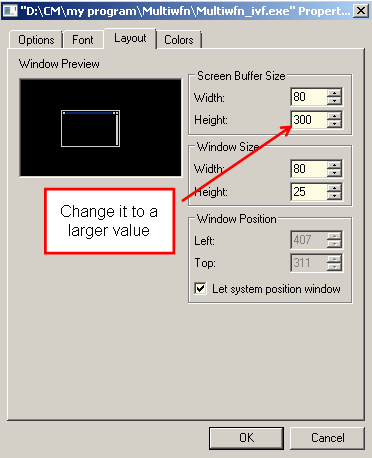
Boot up Multiwfn, click title of the window by right mouse button, click "Properties", select "Layout" page, you will find the default buffer size of the window is 300 (see the screenshot below), that means only up to 300 lines can be recorded in the window, which is obviously too small. Change the value to a larger value, for example 9999, and then click OK button. After that you will find the window capable of recording much more output (If the complete output still cannot be recorded, enlarge buffer size again).
The buffer size setting is saved permanently in system, you do not need to set this value again next time you boot up Multiwfn.
For Linux and MacOS, you can also find a similar option used to set buffer size of terminal.