Multiwfn forum
Multiwfn official website: http://sobereva.com/multiwfn. Multiwfn forum in Chinese: http://bbs.keinsci.com/wfn
You are not logged in.
- Topics: Active | Unanswered
Pages: 1
#1 Re: Multiwfn and wavefunction analysis » RESP charges » 2026-07-16 19:30:29
The issue is not that Multiwfn with and without constraints gives different results. This seems reasonable and consistent.
The main question is why ORCA and G09 give similar results despite using slightly different fitting procedures, whereas Multiwfn is completely different compared to both.
#2 Re: Multiwfn and wavefunction analysis » RESP charges » 2026-07-16 19:28:40
Hello,
I am not sure what you mean by G09 being unable to compute RESP charges. Both the ORCA and Gaussian09 manuals provide the necessary input to compute them.
For Gaussian09, the input is as follows:
```
#P HF/6-31G* Pop=MK IOp(6/33=2) IOp(6/41=15) IOp(6/42=15) IOp(6/50=1)
# Test Units(Ang,Deg)
```
I am also using the MK method with Multiwfn, yet there is still a large discrepancy compared to ORCA, which uses COSMO I believe
#3 Multiwfn and wavefunction analysis » RESP charges » 2026-07-16 18:35:57
- Ainosya
- Replies: 4
Hello,
I am trying to compute RESP charges using ORCA, ORCA_MOLDEN + Multiwfn, and Gaussian09 (G09).
Although ORCA and G09 give very similar results, ORCA does not allow me to impose constraints on equivalent charges. For example, the three O atoms in my O–O–O group do not have the same charge compared to the G09 results.
However, when using Multiwfn (and applying charge constraints), I obtain significantly different charges. I initially thought this difference was caused by the constraints I applied, but I obtained similar charges even without using any constraints in Multiwfn.
I understand that the ESP fitting procedure can differ between ORCA, G09, and Multiwfn, and therefore small differences in the fitted charges are expected. However, while ORCA and G09 give very close results, the charges obtained from ORCA_MOLDEN + Multiwfn with and without constraints are significantly different in a way that seems too large to be explained by small fitting differences.
I also tried increasing the number of grid points per Ångström in the Merz–Kollman (MK) fitting grid in Multiwfn, but the resulting charges remain essentially unchanged.
Is there something I might have missed in the setup or procedure?
# ORCA G09 Multiwfn+Constraint Multiwfn - NO constraint
C -0.10523418 -0.057192 -0.0302549631 -0.0746656346
C 0.70500075 0.699589 0.6288807467 0.6555595774
C 0.10433265 0.083272 0.1741338975 0.1577934901
C 0.44319808 0.397013 0.4040619582 0.4102463676
C 0.09260651 0.143337 0.1492221951 0.1392991455
O -0.63725710 -0.614485 -0.6895841082 -0.6881095374
P 1.48406838 1.333977 1.7508945226 1.7589400745
O -1.00352353 -0.943652 -1.0690527494 -1.0869672209
O -0.97997653 -0.943652 -1.0690527494 -1.0629012194
O -0.98469247 -0.943652 -1.0690527494 -1.0728677364
H 0.03449197 0.018788 0.0254453388 0.0255041882
H 0.02538917 0.018788 0.0254453388 0.0255041882
O -0.88667523 -0.843311 -0.8813434864 -0.8940507921
H 0.56367069 0.518545 0.5691170437 0.5918946082
H -0.02545746 -0.017223 -0.0060522160 -0.0072544242
O -0.76411480 -0.748446 -0.8027866739 -0.7921751928
H 0.44587575 0.440245 0.4486240861 0.4420728698
O -0.67290047 -0.667816 -0.6580181465 -0.6622031133
O -0.50653098 -0.492425 -0.4962606888 -0.4796046960
P 1.37887179 1.252465 1.5714956904 1.5732465978
O -0.95602235 -0.921277 -1.0196082991 -1.0208165689
O -0.95907728 -0.921277 -1.0196082991 -1.0250970345
O -0.95528613 -0.921277 -1.0196082991 -1.0146631266
H 0.06662773 0.056874 0.0528663938 0.0607384487
H 0.07925746 0.056874 0.0528663938 0.0607384487
H 0.01335758 0.015917 -0.0227701773 -0.0201617078
Thanks for your insight
#4 Multiwfn and wavefunction analysis » plane.txt with gnuplot » 2026-05-15 21:14:21
- Ainosya
- Replies: 1
Hello,
I have generated the electron density along a plane using the following inputs:
4
1
2
300,300
0
5.5
2
0a
-6
-5
q
I would like to plot the corresponding plane.txt file generated by Multiwfn with gnuplot. However, the format does not seem to be compatible with the pm3d map command that I usually use for this type of plot with gnuplot.
Is there a way to plot the generated .txt output directly using gnuplot?
Thanks
#5 Multiwfn and wavefunction analysis » Electron Density with various q » 2026-04-28 18:51:29
- Ainosya
- Replies: 1
Hello,
I would like to plot the electron density along a line. To achieve this, I would simply do the following after loading my file into multiwfn:
3
1
2
-5,0,0,5,0,0 A
However, I guess the default for the extra point charge used to compute the ESP is q = -1.00. Is there a way to tune this value, so that one could compute the electron density along a line with different values of q?
Thank you
#6 Multiwfn and wavefunction analysis » Using Cube Files to Obtain r2ψ2 of specific MO » 2026-01-15 19:04:38
- Ainosya
- Replies: 1
Hello,
I would like to ask for clarification regarding how to obtain r2∣ψ∣2 from a cube file of a specific molecular orbital using Multiwfn.
Usng a .fchk file that I generated using G16, I followed this sequence in Multiwfn:
200->5->1->44->ha->0->1
And obtained the following results: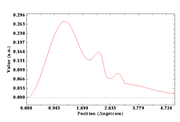
However, when using a cube file format generated by G16 with the command:
cubegen 1 MO=all Octamer.fchk Octamer_MO.cube 80 h
and loading MO 41 into Multiwfn, I followed this sequence:
200 -> 5 -> 1 -> 1 -> 0 -> 1
and obtained: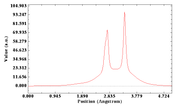
Since I am specifically loading MO 41 (which corresponds to the HOMO), I would like to know how I can generate the same first plot using only a cube file. Although this may seem counterintuitive, I want to use the cube file format because my own software generates only cube files, and I am currently using Gaussian 16 as a sanity check.
Thank you for your help
#7 Re: Multiwfn and wavefunction analysis » Using Cube file » 2025-11-20 20:24:46
Hello
Thank you.
It seems to work. However, if I load a file where the electron density is shifted—for example, along the x-axis to 3.5 Å—then loading the file and using:
3 -> 100 -> 2 -> 3.5,0,0,3.5,5,0
(to plot the charge density along the y-axis) returns an empty plot.
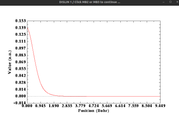
For reference, the one which has the electron density on the center works fine with 3 -> 100 -> 2 -> 0,0,0,5,0,0 A
#8 Multiwfn and wavefunction analysis » Using Cube file » 2025-11-20 07:01:16
- Ainosya
- Replies: 3
Hello,
I have generated my cube file with my own software, which follows Gaussian formatting. I would like to plot the electron density. Multiwfn loads my cube file correctly, but there is no option to print the electron density in the main menu 3.
How can I analyze my cube file to obtain the electron density along different directions (x, y, z) in 1D?
Thank you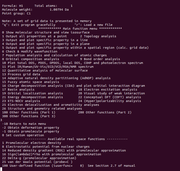
#9 Re: Multiwfn and wavefunction analysis » Isosurface Visualization Not Working » 2025-11-13 16:54:02
Hello,
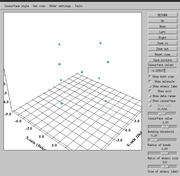
I don’t get an explicit error, but when I select option 5 from the main function menu, followed by options 1 and 1 again (5 → 1 → 1 → -1), a new menu opens, but no 3D plot of the electron density appears in the newly opened window, even though I modified the iso value.
#10 Multiwfn and wavefunction analysis » Isosurface Visualization Not Working » 2025-11-13 04:24:40
- Ainosya
- Replies: 3
Hello,
I am trying to visualize an isosurface of the electronic density using a MOLDEN file generated by CFOUR and converted using Molden2AIM
I have no issue visualizing it using option 3 of Multiwfn—‘Output and plot specific property in a line’—as shown in the following screenshot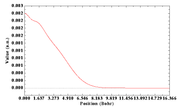
However, when I try to generate an isosurface (option 5 of Main function menu), it does not seem to work. Could this be because I only have ghost atoms?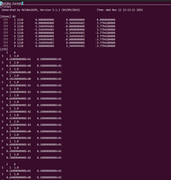
Thank you for your help
#11 Multiwfn and wavefunction analysis » Electronic spatial extent with GAMESS EFP model » 2025-08-29 20:24:50
- Ainosya
- Replies: 1
Hello,
How is the electronic spatial extent computed when using GAMESS with the EFP model included? The values obtained with and without the EFP model seem very different using Multiwfn features, so I would like to understand how this is calculated and whether the difference makes sense.
I have included my input as a reference:
$contrl scftyp=rohf runtyp=ENERGY ICHARG=-1 MULT=2 $end
$GUESS GUESS=HCORE $end
$system timlim=999999100 mwords=1500 $end
$data
point
C1
X 0.0 0.00000 0.00 0.0000000000
S 1
1 1.60 1.0
S 1
1 0.54 1.0
S 1
1 0.18 1.0
S 1
1 0.06 1.0
S 1
1 0.02 1.0
S 1
1 0.007 1.0
S 1
1 0.0025 1.0
P 1
1 0.54 1.0
P 1
1 0.18 1.0
P 1
1 0.06 1.0
P 1
1 0.02 1.0
P 1
1 0.007 1.0
$end
$EFRAG
COORD=CART POSITION=OPTIMIZE
FRAGNAME=H2ORHF ! 1
O1 0.8194151 3.761265799 1.463524578
H2 1.25703299 3.576098096 0.608074709
H3 1.280316821 3.151610025 2.091123223
FRAGNAME=H2ORHF ! 2
O1 3.235309493 0.323789516 0.826027175
H2 2.287042643 0.245318854 0.545046148
H3 3.49739612 -0.607746132 1.015819479
FRAGNAME=H2ORHF ! 3
O1 2.120318615 1.829099822 3.067825523
H2 2.716737776 1.429997077 2.403073423
H3 1.393682966 1.16456958 3.094789951
FRAGNAME=H2ORHF ! 4
O1 1.678625202 2.668205407 -1.097398397
H2 1.313270863 1.8116964 -0.7541709
H3 0.97946341 2.950928994 -1.722548322
FRAGNAME=H2ORHF ! 5
O1 4.031544555 1.1824368 -1.782829834
H2 3.329476315 1.864006148 -1.759136145
H3 3.976510312 0.836686535 -0.865085531
FRAGNAME=H2ORHF ! 6
O1 -0.951816539 2.868496127 -2.329524882
H2 -1.073959051 2.769723797 -1.362605656
H3 -0.725286019 1.94939685 -2.613578646
FRAGNAME=H2ORHF ! 7
O1 2.444206884 -0.836139287 -3.02613159
H2 3.054631981 -0.161539045 -2.645099687
H3 2.256873915 -1.43762867 -2.278819197
FRAGNAME=H2ORHF ! 8
O1 -0.163312655 0.187848718 -2.667647072
H2 0.754775342 -0.071596002 -2.937345617
H3 -0.140401135 0.077193627 -1.667876295
FRAGNAME=H2ORHF ! 9
O1 -1.401793316 2.294204052 0.60887374
H2 -0.932104766 1.425927566 0.407864754
H3 -0.687430812 2.866389123 1.002229255
FRAGNAME=H2ORHF ! 10
O1 3.699576882 -2.47709352 1.109367592
H2 3.131463416 -2.685382029 1.871420207
H3 3.072805134 -2.577208463 0.361498585
FRAGNAME=H2ORHF ! 11
O1 -2.445224889 0.836599263 3.025611356
H2 -3.055175811 0.161613278 2.644465732
H3 -2.257656722 1.437882093 2.278218062
FRAGNAME=H2ORHF ! 12
O1 0.95210556 -2.868100705 2.330332258
H2 1.074165811 -2.769001232 1.363469437
H3 0.725794887 -1.949092547 2.614729384
FRAGNAME=H2ORHF ! 13
O1 0.162391343 -0.187435567 2.668727583
H2 -0.755763142 0.072558403 2.937769271
H3 0.139998853 -0.077701929 1.668796296
FRAGNAME=H2ORHF ! 14
O1 -3.699591074 2.47636163 -1.111380942
H2 -3.13013588 2.684536198 -1.872496966
H3 -3.074228044 2.576788566 -0.362486324
FRAGNAME=H2ORHF ! 15
O1 1.402520332 -2.294147933 -0.609652451
H2 0.932213602 -1.426286264 -0.407941841
H3 0.68812406 -2.86721981 -1.001742925
FRAGNAME=H2ORHF ! 16
O1 -4.031865681 -1.182964379 1.782579242
H2 -3.329245916 -1.86401444 1.758853929
H3 -3.97703888 -0.837156789 0.864855572
FRAGNAME=H2ORHF ! 17
O1 -1.678116086 -2.6672484 1.097288746
H2 -1.312613874 -1.810461014 0.754694558
H3 -0.979443835 -2.950249964 1.722833194
FRAGNAME=H2ORHF ! 18
O1 -3.235616469 -0.32432914 -0.826347925
H2 -2.287511055 -0.245495298 -0.544943741
H3 -3.497831686 0.607048253 -1.016662792
FRAGNAME=H2ORHF ! 19
O1 -0.819056265 -3.761496007 -1.46199334
H2 -1.257084495 -3.574907723 -0.607000601
H3 -1.278522735 -3.151485695 -2.090262866
FRAGNAME=H2ORHF ! 20
O1 -2.119810012 -1.829436025 -3.067565147
H2 -2.715554922 -1.430332226 -2.402179383
H3 -1.393276171 -1.164793559 -3.09513136
$END
#12 Multiwfn and wavefunction analysis » Extracting ESP Along a Line » 2025-05-21 05:05:29
- Ainosya
- Replies: 1
Hello,
I have a CI system for which I would like to obtain the electrostatic potential (ESP) along a line.
More precisely, I want to plot the ESP along a line approaching my system with a charge of -1.
Is there a way to do this using Multiwfn?
My guess is that I need to generate several .fchk files at various distances using Gaussian, but it's still unclear to me how to extract the ESP value, since Multiwfn typically plots the isosurface directly.
Thank you
#13 Re: Multiwfn and wavefunction analysis » Discrepancy in Electronic Spatial Extent Between Multiwfn and Gaussian » 2025-05-17 17:21:55
After compiling source code, directly copying settings.ini from binary package to source code folder (or where you want to put Multiwfn).
Oh, okay.
I wouldn’t have expected to need to do that, since it means I have to download both somehow.
Thanks!
#14 Re: Multiwfn and wavefunction analysis » Discrepancy in Electronic Spatial Extent Between Multiwfn and Gaussian » 2025-05-17 17:20:31
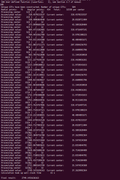
By the way, there is discrepancy between the output given by isuerfunc
And the one returns by doing Multiwfn → 300 → 5 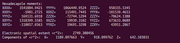
The difference is not significant, but ideally, there should be no difference at all.
#15 Re: Multiwfn and wavefunction analysis » Discrepancy in Electronic Spatial Extent Between Multiwfn and Gaussian » 2025-05-17 17:10:50
I guess my previous messages were unclear. I have version 3.8 and decided to switch to the source code package.
In doing so, I realized that neither the source code nor the settings.ini file needs to be modified, since this feature is already available in the code—although it's not mentioned in the manual for some reason.
However, since there is no settings.ini file in the source code package, I would like to know how to configure the user-defined functions in case I need to adjust them later
#16 Re: Multiwfn and wavefunction analysis » Discrepancy in Electronic Spatial Extent Between Multiwfn and Gaussian » 2025-05-17 16:19:07
I just realized that there's no need to modify the settings.ini file (which I could not find in the source code btw).
Launching Multiwfn → 300 → 5 returns the electronic spatial extent.
For some reason, this feature isn't mentioned in the manual — or did I miss it?
I discovered this while digging through the source code
#17 Re: Multiwfn and wavefunction analysis » Discrepancy in Electronic Spatial Extent Between Multiwfn and Gaussian » 2025-05-17 16:15:13
Okay, this is strange — I noticed that even though I set iuserfunc = 3, it still remains at 0.
So, I decided to use the development version instead of the binary one. However, I couldn't find where the value of iuserfunc is defined in the code. There is no settings.ini file when compiling the code directly.
Can you please tell me wehre the c80tmp (I guess) is defined so I can directly recompile the code. Thanks!
#18 Multiwfn and wavefunction analysis » Discrepancy in Electronic Spatial Extent Between Multiwfn and Gaussian » 2025-05-14 16:12:58
- Ainosya
- Replies: 8
Hello,
I am trying to obtain the electronic spatial extent using different software. To do so, I modified the settings.ini file in Multiwfn by setting iuserfunc = 3.
Multiwfn returns a value of 21092.4988259881, whereas my g16.log output gives 18436.6750. Is there a specific reason that could explain such a discrepancy?
I am unable to upload my files to the forum due to their large size, but could you please confirm whether my procedure for obtaining ⟨R²⟩ using Multiwfn is correct, or if I might be doing something wrong?
Thank you
Pages: 1