Multiwfn forum
Multiwfn official website: http://sobereva.com/multiwfn. Multiwfn forum in Chinese: http://bbs.keinsci.com/wfn
You are not logged in.
- Topics: Active | Unanswered
Pages: 1
#1 2026-05-26 04:29:23
- alexlester1996
- Member
- Registered: 2025-07-30
- Posts: 6
MESP Scan
Dear Professor Tian,
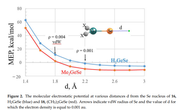
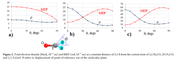
I'm not sure that is the correct description of the topic, but I will try to explain. Recently, I've found in some works these graphs. As I understand, they corresponds to the dependence of MEPS value from chosen distance or angle, which implies the scan of MESP in some manner
So, the main question is how this kind of analysis can be performed technically using MultiWFN software.
Thank you for your help
Offline
#2 2026-05-26 17:49:43

Re: MESP Scan
Hello,
In main function 3 of Multiwfn, you can scan any real space function (e.g. ESP) along a given line, and you can manually define coordinate of the two ends of the line. Please check Section 4.3 of Multiwfn manual for example. According to the first map, one end should be set to nuclear position of Se, and another end should be set to the given point "d".
To reproduce the second map, you need to write your own script to generate a batch of points in the scanning path, then you can use the special feature of main function 5 (see "Special case: Calculate data for a set of arbitrarily distributed points" in Section 3.6 of Multiwfn manual) to calculate ESP values at all points at once.
Offline
#3 2026-05-26 22:00:35
- alexlester1996
- Member
- Registered: 2025-07-30
- Posts: 6
Re: MESP Scan
Dear Professor Tian,
Thank you for the quick answer! I also wonder, is it possible to plot the second map (or even the first) using the main function 13 (Process grid data), so I would be grateful for your professional feedback
Best wishes,
Alex
Offline
#4 2026-05-27 00:54:02
Re: MESP Scan
Dear Professor Tian,
Thank you for the quick answer! I also wonder, is it possible to plot the second map (or even the first) using the main function 13 (Process grid data), so I would be grateful for your professional feedback
Best wishes,
Alex
Dear Alex,
Main function 13 (grid data processing function) is completely irrelevant to this purpose.
Offline
#5 2026-05-27 03:40:05
- alexlester1996
- Member
- Registered: 2025-07-30
- Posts: 6
Re: MESP Scan
Dear Professor Tian,
I am very grateful to you for your help!
Best regards,
Alex
Offline
Pages: 1